Icon of program: Quicksys DiskDefrag

Quicksys DiskDefrag for Windows

  • Free
  • 4.2
    37
  • 6.5K
  • V1.0.7.7-beta
Free Download for Windows

View an ad to download for free

Optimize Your Storage with Quicksys DiskDefrag

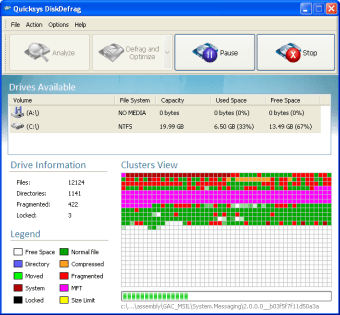
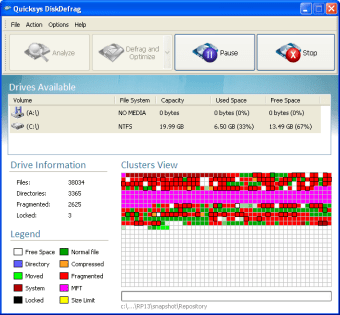
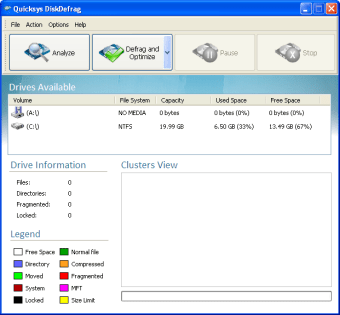
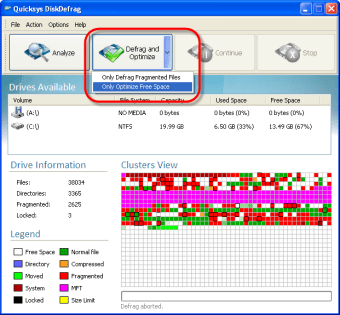
Quicksys DiskDefrag is a free utility for Windows designed to enhance disk performance through effective defragmentation. This tool organizes fragmented data on hard drives, improving file access speed and overall system efficiency. With a user-friendly interface, it allows users to quickly analyze their disk status and initiate defragmentation with just a few clicks.

Top Recommended Alternative

The application offers various options to customize the defragmentation process, including scheduling and selective defragmentation of specific files or folders. Quicksys DiskDefrag is particularly useful for users looking to maintain their system's performance over time, ensuring that files are stored in an orderly manner, which can significantly reduce loading times and enhance overall system responsiveness.
 0/5

App specs

  • Developer

  • License

    Free

  • Version

    1.0.7.7-beta

  • Latest update

  • Platform

    Windows

  • OS

    Windows Vista

  • Language

    English

  • Downloads

    6.5K

  • Size

    1.12 MB

Program available in other languages


Icon of program: Quicksys DiskDefrag

Quicksys DiskDefrag for PC

  • Free
  • 4.2
    37
  • 6.5K
  • V1.0.7.7-beta
Free Download for PC

View an ad to download for free


User reviews about Quicksys DiskDefrag

4.2

2 reviews

Add review

Main reviews for you

  • Anonymous user

    Still In Beta [Updated Review]. Before I gave this a review solely on potential and by the perceived notion that because it can scan slow that it is actually powerful. The truth is there is no true telling because it's in beta and has a lot of bugs. Also there hasn't been a new version for almost a year.The downside is it is still in beta and is slow at scanning. The start up time is also annoying.I actually still recommend continuing trying this and see where Quicksys takes their defragger. If they can work out the bug, they may have something special in the end. Until then make a defragger such as SmartDefrag your defragger of choice. Pros: Scheduled ScanningPotentialEye Pleasing Cons: Slow ScanNo Telling How Much It Enhances Your Computer's PerformanceIn Beta

  • Anonymous user

    A Powerful Free Automatic Defragger. If your one of those people who wants a powerful defragger than you can set to automatically defrag your computer rather than have to manually defrag your computer each and every time then Quicksys Disk Defrag is a great free solution. It is not only powerful but it is one of the few free solutions where you can set it to automatically defrag your computer.The downside to Quicksys is it can be a resource hog and defragging can be a little slow for some people's taste.Overall there really isn't a better choice for those who want a free defragger that you can set to automatically defrag your computer. So if you don't want to always manually defrag your computer then give Quicksys Disk Defrag a try. Pros: Power DefraggerAutomatic Defrag OptionFree Cons: Can Hog ResourcesSlow Defragger

More

You may also like

Explore Apps

Latest articles

Laws concerning the use of this software vary from country to country. We do not encourage or condone the use of this program if it is in violation of these laws.
Softonic

Is Quicksys DiskDefrag safe?

Score result: Clean

This file passed a comprehensive security scan using VirusTotal technology. It is safe to download.

  • Virus free
  • Spyware free
  • Malware free
  • Verified by Security Partners

    VirusTotal logo

Scan Info

Last scan
Wednesday, December 2, 2020
Scan provider
VirusTotal

Softonic security commitment

Quicksys DiskDefrag has been thoroughly scanned by our advanced security systems and verified by industry-leading partners. This file comes from the official developer and has passed all our security checks, showing no signs of viruses, malware, or spyware. For more information, visit our Security and Trust Center

Signed in to Softonic as